Keeping a Chinese-made EV charging station dependable takes more than wiping its screen and checking its cable. It requires steady attention to connectors, cooling, software, and installation conditions. The right routine also depends on the manufacturer’s maintenance instructions and the station’s operating environment. A unit beside a coastal road may face salt and moisture; one in a busy depot may collect dust and suffer frequent cable handling. Small details matter. So do clear service records.
Quality-management expert W. Edwards Deming said, “A bad system will beat a good person every time.” His point applies to charging operations: dependable service needs repeatable checks, not memory alone. For owners asking how to maintain an EV charging station, a useful routine starts with visual inspections and documented fault reviews. Look for cracked housings, loose connectors, damaged cables, blocked vents, or unusual heat. Check warning messages and charging logs, then follow the maker’s guidance before adjusting equipment. Keep service dates and replacement parts recorded. A checklist helps, but it is not a diagnosis. Humidity, heavy use, and poor ventilation can expose weaknesses that a quick glance misses. This guide explores practical maintenance steps for stations sourced from China, including what to verify with suppliers and qualified technicians. The aim is reliable charging, not a perfect-looking checklist.
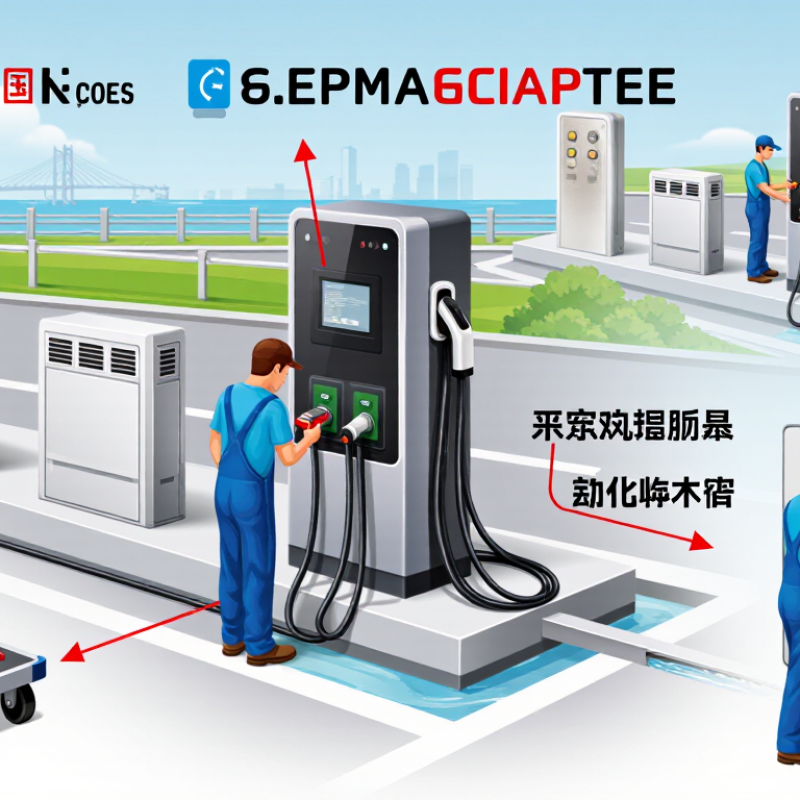
How to Maintain the Best EV Charging Station from China?
Understand the EV Charging Station’s Design and Operating Requirements
A reliable EV charging station begins with the correct design, not a polished cabinet. The IEA reported more than 14 million electric cars were sold worldwide in 2023, while public charging points exceeded four million. This growth increases pressure on equipment, software, and local grids.
Before installation, check voltage, phase capacity, grounding, and available power. A Chinese-made station may require adjustments for local electrical rules. Confirm protection against overload, leakage, surges, moisture, and dust. The enclosure should match the site environment. IEC 61851 requirements should guide charging control and communication. Cable storage also matters. A twisted cable can become a daily failure point.
Operating discipline is equally important. Inspect connectors, cooling fans, emergency stops, and insulation regularly. Remove dust from ventilation paths. Review charging logs for repeated faults, abnormal temperature, or slow output. The IEA notes that fast-charging demand is expanding rapidly, making thermal management increasingly important. Remote monitoring can reduce downtime, but it cannot replace physical inspection.
Small details matter. Keep firmware updates controlled and recorded. Test load sharing during peak hours. Check whether the station restarts safely after a power cut. A clean screen proves little. In field conditions, rain, grit, and careless cable handling expose weak design quickly. Some maintenance plans look complete on paper, yet ignore connector wear. That is where improvement is still needed.
Understand the EV Charging Station’s Design and Operating Requirements
Common charging configurations range from approximately 7.4 kW AC units to 350 kW DC fast chargers. Higher-power systems require stronger electrical protection, reliable thermal management, adequate ventilation, secure cable handling, and regular inspection of connectors, insulation, communication systems, and emergency-stop devices. Actual specifications should follow local regulations and the equipment manufacturer’s requirements.
Maintaining an EV charging station starts with a careful inspection of its power supply. Check voltage stability, breaker condition, and grounding connections during scheduled servicing. Loose terminals can create heat, even when the charger still works normally. Record unusual noises, burning smells, or repeated fault messages. These details often reveal problems before a sudden shutdown occurs. Use calibrated testing equipment and follow local electrical requirements. A qualified electrician should handle internal electrical work.
Tips: Keep cables off wet ground and away from sharp edges. Inspect the cable jacket for cuts, swelling, or stiffness. Examine connectors for bent pins, discoloration, and poor locking. Clean contact surfaces with approved methods. Do not force a connector into place. Small damage can become expensive.
The enclosure also needs practical attention. Check seals, hinges, vents, and mounting points after severe weather or heavy use. Dust and moisture may enter through a damaged gasket. This can affect insulation and internal components. I once found a charger with a clean exterior but a clogged ventilation path. It looked reliable, but heat had already weakened several parts. That mistake taught me not to judge condition by appearance alone. Keep inspection records with dates, measurements, and replaced parts. Review them regularly, because maintenance routines can miss patterns when nobody compares the notes.
| Component | What to Inspect | Recommended Action | Suggested Frequency | Warning Signs |
|---|---|---|---|---|
| Power supply and electrical connections | Check the supply circuit, protective devices, terminal connections, and charging-station status indicators. Look for discoloration, looseness, or heat damage. | Have a qualified electrician verify the installation and tighten connections according to the manufacturer's specified torque. Do not open energized equipment. | Monthly visual check; annual professional inspection | Repeated breaker trips, unexpected shutdowns, burning odor, or heat marks |
| Charging cable | Inspect the full cable length for cuts, cracks, flattened areas, exposed conductors, and damage near the handle or station entry. | Keep the cable off vehicle paths and sharp edges. Replace damaged cables with a compatible part; do not tape over damaged insulation. | Before use | Visible copper, deep cuts, unusual stiffness, or intermittent charging |
| Charging connector and inlet | Check the connector shell, locking mechanism, contact area, and inlet for dirt, moisture, corrosion, or deformation. | Clean only as directed by the equipment instructions, using a dry, lint-free cloth when appropriate. Keep contacts dry and avoid abrasive tools or liquids. | Before use; clean as needed | Loose fit, damaged latch, darkened contacts, or visible corrosion |
| Enclosure and mounting | Look for cracks, loose mounting hardware, damaged seals, blocked ventilation openings, and signs of water or pest entry. | Keep the enclosure secure and ventilation unobstructed. Arrange repairs if seals, panels, or mounting points are damaged. | Monthly | Water inside the enclosure, loose housing, cracked panels, or persistent condensation |
| Grounding and protective devices | Confirm that protective-device indicators and self-test functions show normal status, where provided. Check for reported ground-fault errors. | Follow the product instructions for user-operated tests. Refer trips or failed tests to a qualified electrician; never bypass protection. | According to product instructions; review monthly | Failed self-test, persistent fault indication, or repeated protective-device trips |
| Weather exposure and surroundings | Check that drainage is clear and that snow, standing water, direct impact risks, or excessive dust are not affecting the unit. | Maintain the required clearance and use the station only within its rated environmental conditions. Do not pressure-wash the equipment. | Seasonally and after severe weather | Flooding, impact damage, blocked airflow, or water collecting around the base |
| Charging performance and records | Review charging-session interruptions, fault codes, charging duration, and any recurring user reports. | Record faults and service dates. Use the equipment's approved diagnostic process, and contact a qualified service provider for recurring errors. | Monthly review | Repeated failed sessions, unexplained power reduction, or recurring error codes |
A clean charging station works more reliably and feels safer to use. Dust, road salt, and oily residue can collect around the screen, handle, and cable. Wipe these surfaces with a soft, slightly damp cloth. Disconnect the power before detailed cleaning, following the equipment instructions carefully. Never spray water directly into sockets, vents, or charging connectors. A quick wipe is not always enough.
Inspect the cable for cuts, flattening, or unusual stiffness. Check the connector for moisture, dirt, and damaged pins. Use a dry, non-metallic brush to remove loose particles. Avoid abrasive pads and strong solvents, which may damage protective coatings.
Weather protection needs regular attention, not only during storms. Keep the unit away from standing water and improve drainage around its base. Check seals, covers, and mounting points for cracks or looseness. In hot conditions, leave ventilation openings clear and prevent direct heat buildup. In cold or wet climates, remove ice gently and allow moisture to dry naturally. A weather shield can help, but it must not block airflow or trap condensation. Record cleaning dates and visible defects, then arrange qualified service when electrical damage appears.
A charging station can look sound while delivering unstable power, so test it under a realistic vehicle load. Use a suitable meter to compare the displayed output with measured voltage and current. Check charging time across several sessions, not just one. Note ambient temperature, cable length, and vehicle state, since each can affect results. Small differences are normal. Repeated drops deserve investigation.
Inspect the connector, cable jacket, and enclosure for cracks, discoloration, or unusual heat. Confirm that grounding and built-in protective functions respond as specified in the product documentation. Never open energized equipment; have a qualified technician handle internal checks. A quick visual check helps, but it cannot prove every protection feature works. I have seen a loose connector cause more trouble than a dramatic fault, and it is easy to overlook.
Test the software, too. Start and stop sessions through each available control method, then check whether energy readings and charging records match the meter. Review error alerts, scheduled charging, and network reconnection after a brief outage. Install firmware updates through the approved process, and keep a record of version numbers and test results. Logs are useful. Still, software can report success while a physical connection remains poor, so verify both sides. If a result feels inconsistent, pause and repeat the test rather than assuming the station is fine.
A reliable EV charging station needs scheduled preventive service, not only emergency repairs. In my field experience, busy sites often show warning signs before a full failure. A warm connector, cracked cable jacket, or loose wall mount deserves immediate attention. Small faults can become expensive interruptions.
Set inspection dates according to charging frequency, local weather, and installation conditions. A technician should check the cable, connector pins, enclosure, display, emergency controls, and ventilation openings. Dust around air passages can raise internal temperatures. Moisture marks may reveal a damaged seal. Keep service records with dates, fault codes, measured temperatures, and replaced parts. Clear records support consistent decisions.
Replace worn or damaged parts with approved components that match the station’s specifications. Do not continue using a connector with burn marks or a cable with exposed insulation. Power should be isolated by qualified personnel before internal work begins. After replacement, test charging performance, communication, grounding, and protective shutdown functions. I once underestimated a slightly stiff connector. It passed a quick visual check, but repeated use later caused unreliable charging. That mistake reinforced the value of hands-on testing. A rushed inspection can miss the detail that matters.
Confirm voltage, phase capacity, grounding, and available power. Check that protection suits the site’s moisture, dust, and surge risks.
Set inspection dates based on usage, weather, and installation conditions. Busy sites may need closer attention. A fixed calendar alone can miss changing wear.
Look for cuts, swelling, stiffness, or exposed insulation. Keep cables away from wet ground and sharp edges.
Bent pins, discoloration, burn marks, or unreliable locking need action. Don’t force a connector into place.
Check seals, hinges, vents, and mounting points. Dust and moisture can enter through damaged seals. A clean exterior proves little.
Review fault codes, temperatures, and repeated slow charging. Compare records over time; patterns are easy to miss when notes sit unread.
No. Monitoring can flag faults, but technicians still need to check connectors, ventilation, and visible damage.
Qualified personnel should isolate power before internal work. Then test charging, communication, grounding, and protective shutdown functions. Don’t skip the hands-on check.
Maintaining a reliable EV charging station starts with understanding its design, operating requirements, and recommended service intervals. Regularly inspect the power supply, cables, connectors, and enclosure for wear, looseness, damage, or signs of overheating. Keep the station clean and clear of dust, moisture, and other contaminants, and check that its surroundings provide suitable protection from weather. These routine checks can help identify small problems before they affect charging or equipment reliability.
A complete maintenance routine should also include testing charging performance, safety features, and software functions to confirm that the station operates as expected. Record inspection results, schedule preventive service, and replace worn or damaged parts promptly. By following these practical steps, operators can better understand how to maintain an EV charging station, support consistent performance, and help extend the useful life of the equipment.

Irvion Charger