Why do some EV chargers require apps? The answer lies in how charging networks manage payment, access, pricing, and station data. Unlike a gasoline pump, a networked charger may need to confirm your account, display live availability, and calculate time-based fees. The process can feel unnecessarily complicated, especially when rain hits your phone screen.
The International Energy Agency’s Global EV Outlook 2024 reported more than four million public charging points worldwide by the end of 2023. That rapid expansion creates a practical problem: chargers are operated by different companies, with different software and payment systems. J.D. Power’s 2024 U.S. Electric Vehicle Experience Ownership Study also identified public charging reliability as a major weakness for EV owners. An app can support remote monitoring, digital receipts, reservations, and customer service. Yet it can also create friction when registration is required for a five-minute charge.
EV charging analyst Loren McDonald has described the current experience as “too complicated,” a criticism that remains difficult to dismiss. His comment reflects a broader industry concern: convenience should not depend on remembering multiple passwords. Some chargers accept contactless cards or Plug & Charge technology, while others still push drivers toward proprietary apps. The difference is visible at the curb, where one station starts instantly and another asks for an update. App-based charging can be useful, but it is not automatically user-friendly. The industry still needs simpler, more consistent access.
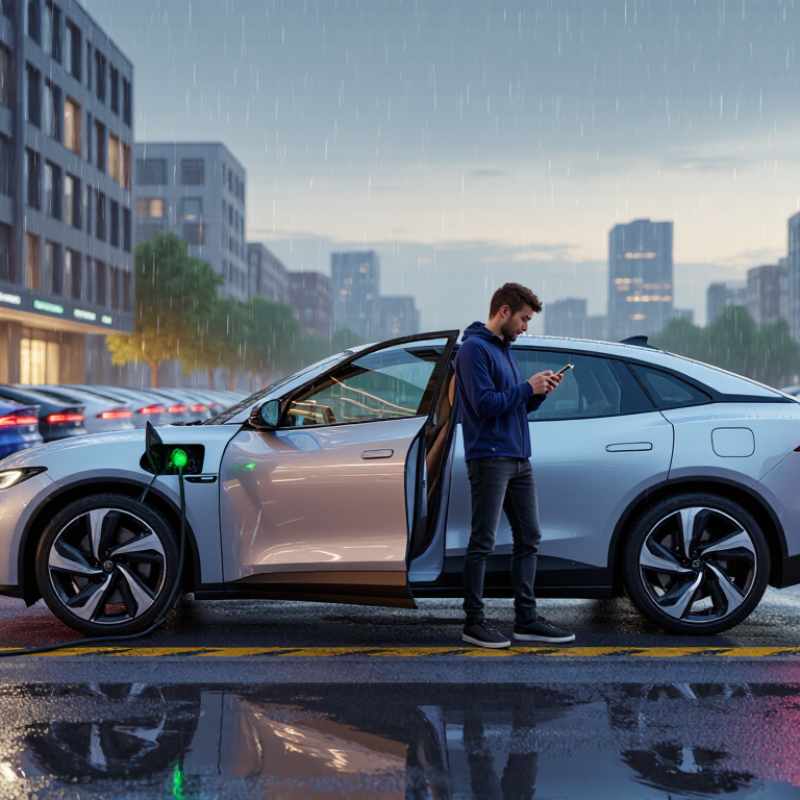
App-based EV charging means using a mobile application to find, unlock, start, and pay for a charging session. The app may show live availability, connector type, estimated charging speed, and pricing. It can also send an alert when charging finishes. This matters because public charging is expanding quickly. The International Energy Agency reported in Global EV Outlook 2024 that the world had almost four million public charging points by the end of 2023. More chargers also create more interfaces to understand.
An app can replace a physical membership card or payment terminal. It may store a payment method and connect one account across different charging networks. However, this system is not always smooth. Weak reception can delay activation. A forgotten password can make a nearly empty battery feel more stressful. The U.S. Department of Energy’s Alternative Fuels Data Center notes that public chargers differ in connector types, charging speeds, access methods, and payment options. That variation explains why drivers often need more than one app. It also shows a weakness: convenience depends on digital access.
Tips: Install required apps before a long trip. Create accounts at home, not beside the charger. Keep a payment card available when supported. Check pricing, idle fees, and station status first. Do not trust every availability symbol completely; real conditions can change quickly. A screenshot of instructions may help when reception disappears.
An EV charger may require an app because the app connects a driver, vehicle, payment method, and charging station. It acts like a digital key. When a driver scans a QR code, the app sends the charger’s identification number to a secure server. The server checks the account, payment details, and station status before approving the request. Some chargers also accept an RFID card or vehicle connection. These methods identify the driver without requiring a phone screen.
The process usually takes only a few seconds. The charger confirms its location, plug type, and available power. The app then sends a start command through the network. A light may change from blue to green, while the vehicle begins drawing electricity. During the session, the system records energy use, start time, and charging cost. This information helps drivers review receipts and report problems accurately. In my experience, a weak signal can delay activation, even when the charger appears ready. That part feels poorly explained. Drivers may repeatedly tap the screen, making the delay worse. Privacy also deserves attention. A reliable service should clearly explain which data it stores and why. Drivers should check the station number before starting, especially in busy parking areas. One wrong selection can begin a session at a nearby charger. Sometimes, a simple confirmation screen would prevent that mistake.
EV charging systems use different authentication signals to identify a driver, locate the intended charger, and authorize energy delivery. The chart shows which signals are typically involved in common charging workflows.
App-based charging usually combines an account or session token with a charger identifier and a remote start request. RFID/NFC charging uses a physical credential, while Plug & Charge uses a vehicle certificate exchanged automatically through the charging protocol.
EV charging apps do more than start a session. They show nearby stations, connector types, power levels, and current availability. In practice, that map can prevent a stressful detour. Some apps display operating hours, parking limits, and access instructions. Data is not always perfect. A charger may appear available while another driver is already connecting. Recent user reports can help, although they also need cautious reading.
Most apps let drivers begin and stop charging remotely. They can show energy delivered, charging speed, elapsed time, and estimated cost. A live session screen is useful when you are shopping nearby. Notifications may warn you when charging finishes or reaches a selected percentage. Payment tools often store billing details and issue digital receipts. Some platforms support guest payment, but availability depends on the charger and local requirements.
Route planning is another practical feature. An app may suggest charging stops based on battery range, weather, traffic, and elevation. That sounds precise, yet estimates can change quickly in cold weather or heavy rain. Drivers should check the vehicle dashboard before trusting a predicted arrival percentage. Support tools may offer fault reporting, troubleshooting steps, and contact options. I still prefer carrying a backup payment method and saving key station details offline. One frozen screen should not control the whole trip.
A charging network may require an app to identify the driver, unlock the connector, and process payment. The app links a vehicle session to a user account. This helps operators record energy use accurately. It also lets them display live information, such as charger availability, estimated costs, and charging speed.
From practical charging experience, the app can make a busy station easier to manage. A driver can reserve a connector, receive an alert when charging ends, or contact support from the same screen. Operators gain useful data about faults, peak demand, and maintenance needs. That information can improve reliability over time. Still, the process is not always smooth.
Connectivity still fails.
A weak signal can prevent a charger from starting, even when the vehicle and cable work properly. Phone batteries die. Accounts may need verification at inconvenient moments. Some drivers also dislike creating accounts before a short charging stop. Requiring an app can create a barrier for visitors, older users, or people with limited mobile access. A network should therefore offer clear instructions and, where possible, an alternative payment method. App-based control may reduce fraud and simplify support, but it can also shift too much responsibility to the driver. The balance deserves more attention.
Why Do Some EV Chargers Require Apps?
Charging apps help operators authenticate drivers, process payments, show availability, and manage changing prices. They can also record energy use and send fault notifications. The International Energy Agency reported over four million public charging points worldwide in 2023, an increase of more than 40% in one year. At this scale, software can reduce manual work. Yet convenience depends on mobile signal, account access, and a charged phone.
Apps are not the only option. Many chargers support contactless bank cards, RFID cards, QR-code payment pages, or plug-and-charge authentication. Some sites also accept roaming agreements, allowing one account to work across several networks. A visible screen matters, especially when drivers cannot read small phone text outdoors. The U.S. Department of Energy recommends clear payment access and reliable station information for public charging. Still, real-world systems vary. A card reader may be offline. A QR page may load slowly. That gap deserves attention.
Tips: Before a long trip, check whether the charger accepts contactless payment. Keep one physical payment card available. Save the station’s support number. Download essential charging details before leaving. Test your preferred method near home. No system is perfect. Also check idle fees, parking limits, connector compatibility, and pricing before plugging in. A small paper note with backup instructions sounds old-fashioned, but it can help when a phone battery dies.
| Access or Payment Method | How It Works | Internet or Mobile Service Needed | Typical User Benefits | Common Limitations | Practical Considerations |
|---|---|---|---|---|---|
| Mobile App | The driver creates an account, locates a charger, starts a session, and usually pays through the application. | Normally required for account access, charger status, session control, or payment. The charger itself may also need a network connection. | Provides live availability, charging history, digital receipts, settings, and support features. | Requires installation, registration, phone access, and often a valid payment method before charging begins. | Useful for regular users, but inconvenient when the phone battery is low, data coverage is weak, or several different apps are needed during a trip. |
| Contactless Bank Card | The driver taps a compatible payment card or mobile wallet on the charger's payment terminal and follows the on-screen instructions. | Usually requires a network connection at the charger for payment authorization, but does not require the driver's phone to have an app. | Fast access for occasional users and visitors; no account creation or app download is normally necessary. | Not every charger has a card reader. A payment authorization hold may temporarily reduce available card balance. | Check whether the terminal accepts contactless payments and whether the card issuer permits unattended or international transactions. |
| QR Code Web Payment | The driver scans a code, opens a payment webpage in a browser, enters the required details, and starts the session online. | Requires mobile data or Wi-Fi and a browser. A dedicated app is generally unnecessary. | Offers app-free access while supporting online payment and digital receipts. | Slow or unavailable cellular service can prevent the payment page from loading. QR codes can also become damaged or difficult to scan. | Use the code displayed on the charger itself and verify the web address before entering payment information. |
| RFID or NFC Access Card | The driver taps a registered access card or key fob on the charger to authenticate and begin charging. | The driver may not need a phone, but the charger generally needs network connectivity to verify the account and record the session. | Convenient for frequent users and drivers who prefer a physical access method. | A card usually must be issued or registered in advance. It may not work across unrelated charging networks. | Keep a backup payment method because a lost, damaged, or unrecognized card can prevent access. |
| Plug and Charge | The vehicle and charger identify each other automatically through digital certificates after the cable is connected. | Initial vehicle and account setup is required. The charging session may depend on communication between the vehicle, charger, and service provider. | Provides a simple experience without opening an app, scanning a code, or tapping a card at every session. | Both the vehicle and charger must support compatible standards and have the correct account and contract settings. | Confirm compatibility before relying on this method during travel; carry another payment option for public chargers. |
| Start Button or Free Access | The driver connects the vehicle and presses a physical button, or charging starts without separate authentication. | May work without a phone or user account, although the charger can still use a network for monitoring or control. | Simple and accessible for destinations where charging is included with parking, lodging, employment, or another service. | Often unavailable at public pay-per-use chargers. Free access may be limited by time, location, or site rules. | Read the local instructions carefully because parking fees, idle fees, or time limits may still apply. |
| Telephone Support or Manual Activation | The driver calls a displayed support number or requests assistance from on-site staff to activate the charger or process payment. | Requires a working phone connection. The charger normally still needs a network connection for remote activation. | Provides an alternative when the app fails, the payment terminal is unavailable, or the driver needs assistance. | May involve waiting, limited operating hours, or additional verification before charging can start. | Record the charger identification number and keep the support contact visible before leaving the vehicle. |
| Offline or Limited-Connectivity Operation | Some chargers can continue an already authorized session or provide basic local controls when communication is temporarily interrupted. | Limited or no connectivity may be possible for certain functions, but payment authorization, remote monitoring, and session reporting can be affected. | May allow charging to continue during a short network outage. | A new session may not start, payment may not be accepted, and the final cost or receipt may be delayed. | Do not assume that offline operation is supported; check the charger's instructions and retain evidence of the session if a billing issue occurs. |
| Why an App Is Required | Operators use apps to manage user accounts, payments, remote commands, pricing, reservations, usage records, and customer support. | The charger and service platform generally need network connectivity for these digital services. | Enables detailed information such as live status, estimated availability, charging history, and notifications. | Creates friction for occasional users and can exclude people with limited smartphone access, poor connectivity, or privacy concerns. | App requirements are often linked to billing and network management rather than the basic electrical function of charging. |
| Recommended Backup Plan | Carry at least two access options, such as a contactless card plus a web-payment method or physical access card. | Combines different requirements so that one connectivity or authentication failure is less likely to stop the trip. | Improves reliability during travel, especially when chargers use different payment and access systems. | Not every backup method is accepted at every location, and some chargers may have separate authorization rules. | Before a long journey, check connector compatibility, operating hours, payment options, pricing, parking rules, and the availability of nearby alternatives. |
The app identifies the driver, vehicle, payment method, and charging station. It works like a digital key. It can also unlock the connector and record energy use.
You scan the station’s QR code or select its number. The app checks your account, payment details, and station status. Then it sends a start command through the network.
Activation often takes only a few seconds. A light may change from blue to green. The vehicle then begins drawing electricity.
Weak mobile signal can delay activation. A low phone battery or account problem can also stop the process. Repeated tapping may not help. It may worsen the delay.
It may record energy use, starting time, charging cost, and station details. This information supports receipts and fault reports. Drivers should still check the details carefully.
Check the station number before confirming. Busy parking areas may contain several similar chargers. One wrong selection can start a nearby session. A confirmation screen would help.
Some chargers accept contactless cards, RFID cards, QR payment pages, or vehicle authentication. Certain payment accounts may also work across multiple charging networks. Options vary by station.
Check connector compatibility, pricing, idle fees, and parking limits. Confirm whether contactless payment works. Keep a physical payment card available. Small backups matter.
The service may store account, payment, location, and charging information. Drivers should review what data is collected and why. The explanation may still feel incomplete. Clearer privacy details are needed.
App-based EV charging means using a smartphone application to locate compatible stations, check availability, authorize payment, and manage a charging session. When a driver creates an account, the app can identify the vehicle or user through login details, a digital payment method, a QR code, or a station-specific code. After verification, the driver selects a connector and starts or stops charging from the phone. These apps may also show pricing, charging speed, session history, receipts, live status updates, and notifications when charging is complete.
The main reasons why do some EV chargers require apps include easier payment processing, user authentication, network management, and the ability to provide real-time information. App requirements can also help operators monitor equipment and support customers remotely. However, not every driver wants to depend on a smartphone, mobile signal, or account registration. Some stations offer alternatives such as contactless card payment, web-based access, text instructions, or on-site payment terminals. Drivers should check accepted payment methods, pricing policies, and connectivity requirements before beginning a trip.
Irvion Charger